
A Twitch duck race your chat can join
Viewers type !join to get a duck and a card on your stream, and the river picks the winner live — no bot, no login, no copying names.
A stream giveaway or a chat game works best when everyone in chat can take part, not just the names you copied by hand. With Random Duck Race your viewers join the race themselves: they type !join in your Twitch chat, a duck with their name appears on the start line, and the river picks the winner live on stream. No bot to install, no account to link, no list to copy.
Set up your stream lobby, step by step
- Open a room. On randomduckrace.com, press Room, then Create a room, and choose Twitch chat joins the race.
- Type your Twitch channel. The game looks it up on Twitch as you type and shows ✓ Channel found (a link to your channel works too).
- Choose who can join: Everyone, Subscribers, or Subs, VIPs & mods. Turn on Approve players to let each viewer in yourself, Race with my own duck to race too, or Start at a set time for a race that starts by itself.
- Sign in with Twitch (optional). Signed in on your own channel, the race posts its big moments in your chat — the entries opening, the countdown, the entries closing, the start and the winner — and your lobby shows a Verified badge. Without signing in, everything else works the same. Press Create.
- Put the lobby on stream. A big banner tells your viewers to type
!join, and every one of them gets a card and a duck as they come in, up to 1,000 (!leavetakes it back).
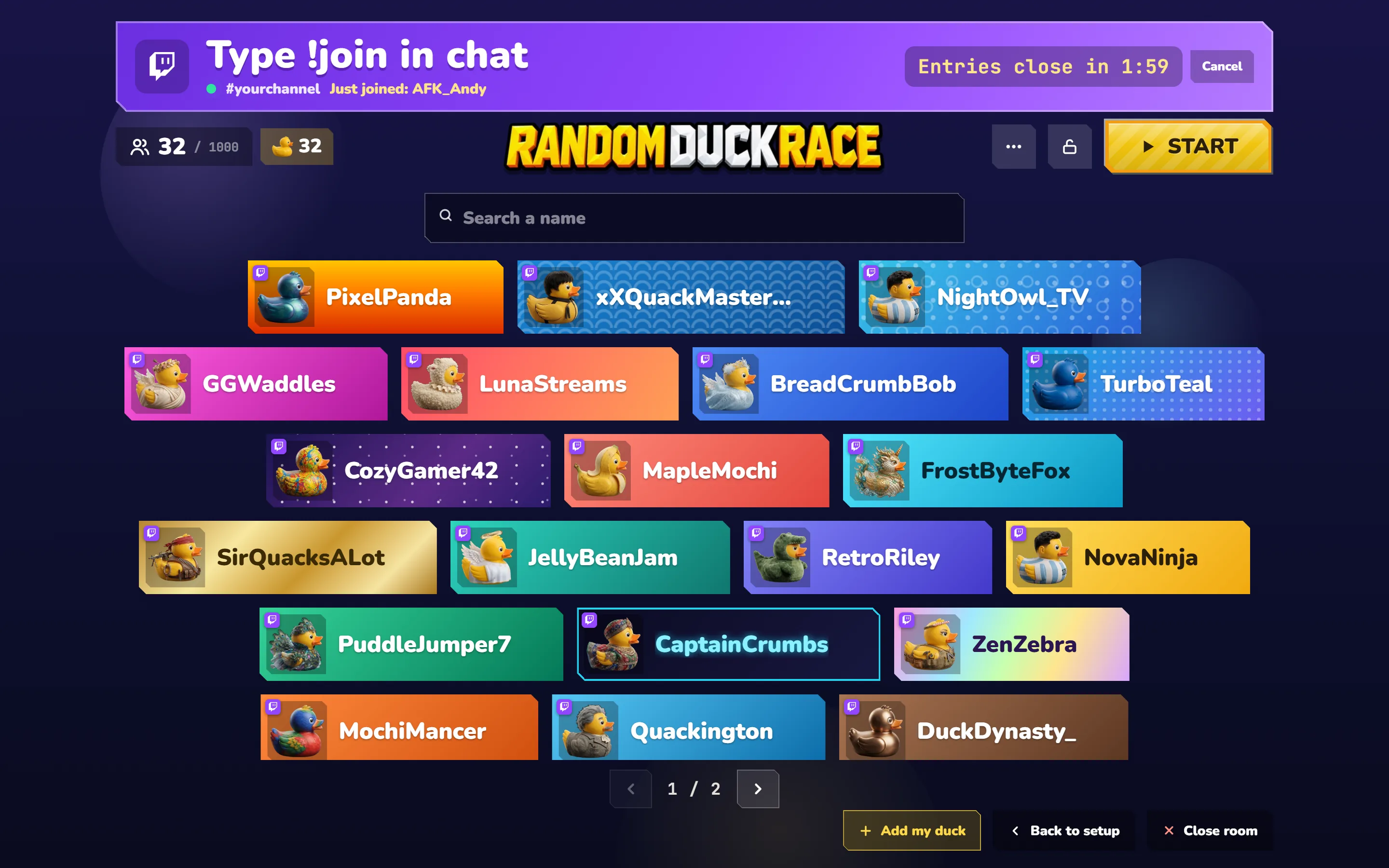
- Close the entries when you're ready. Press 1, 2 or 5 min on the banner for a countdown everyone can see, or the lock to close them now (Open entries opens them again).
- Start the race. Press Start, then Start the race. Your viewers watch it on your stream; whoever joins during a race is in the next one.
For the stream itself, open ⋯ › Clean view: every button disappears, leaving the banner, the cards and Start (the eye in the corner, or Escape, brings them back). ⋯ › Join sound plays a soft pop for each new viewer, and Chat commands › Messages in chat turns the race's messages off or on, all of them or one by one. A stream lobby takes no phones: the viewers join from the chat and watch your stream.
Run the race from your chat
Away from the browser? Type the host's commands in your own chat. Only you can use them (Twitch marks who the streamer is), and your moderators too if you turn that on in Chat commands › Host.
!startstarts the race.!closecloses the entries now;!close 2closes them in 2 minutes (up to 10).!openopens them again,!cancelstops the countdown.!approvelets everyone waiting in (!approve namejust that viewer);!kick nametakes a viewer's duck out.- On the winner screen:
!againraces again,!removetakes the winner out and races again,!lobbygoes back to the lobby. !cleanturns the clean view on or off.
Putting the lobby on stream
In OBS Studio or Streamlabs, add a Window Capture of the browser window (or a Display Capture of the screen it is on). For the race's music and sounds, add an Application Audio Capture of the browser, or keep your desktop audio on. A browser window of its own, sized 1920 × 1080, fills the scene neatly.
More than one prize?
The finishing order already gives you a first, second and third; turn on Settings › Winner screen › Top 3 to show all three on the winner's screen. For one race per prize, press Remove winner when the race ends: the winner leaves the list, everyone else stays in, and the next race starts. Viewers who type !join while a race is running get a duck in the next one.
Tips for a smooth stream
- Pin a chat message such as “Type !join to get a duck — entries close at 8:30”, so latecomers know what to do.
- Leave the lobby on screen before you start, so everyone can find their card (the search finds any name).
- Name the race (the pencil next to the race's title in the setup) so the winner's screen says what it was for.
- Up to 1,000 viewers can join one race. Names are kept as Twitch shows them.
- Close the entries on a countdown in the stream lobby, so nobody is surprised when the doors shut.
- Keep the proof: download the result as an image or a spreadsheet from the full result.
Who can join, and what the game sees
The game reads your chat the way a logged-out viewer does, straight from Twitch in your browser, and nothing passes through our servers. It writes in your chat only if you sign in, only in your own channel, and only the race's moments (you can turn them off in the lobby's ⋯ › Messages in chat); the sign-in stays in your browser and can be ended any time with Sign out. Your chat's own rules still apply — in followers-only or subscribers-only mode, only those who can chat can type !join.
Questions
Do I need to log in to Twitch or install a bot?
No bot, and no sign-in needed: type your channel name and the game reads the chat like a viewer who isn't signed in. Signing in with Twitch is optional — it lets the race post in your own chat and shows a verified badge on your lobby.
Someone typed !join but there's no card for them. Why?
Check that the entries are open, that the banner's dot is green (connected to your chat), and that they typed !join at the start of the message. With Subscribers or Subs, VIPs & mods only those can join; with Approve players they wait under “Waiting to join”. If a race was running, they get a duck in the next one, and a name already in the lobby isn't added twice.
Does it work with YouTube, TikTok or Kick?
Joining from the chat works with Twitch. For other platforms, paste the names into the list yourself — see the giveaway picker guide.
Can viewers pick their own duck?
Viewers who join from the chat get a duck at random. To let people choose their own duck and watch the race on their phone, open an ordinary room instead.
Can viewers join the stream lobby on their phone?
No — a stream lobby is joined from the chat, and the race is watched on your stream. A viewer who opens its code on a phone is asked to type !join in your chat instead.
Can I use it for paid raffles or betting?
No. Random Duck Race is a free game for fun: use it for free giveaways and friendly chat games where nobody pays to take part (see our terms). Twitch has its own rules for giveaways, too.
Keep reading
All posts Giveaways & events
Giveaway Picker: Draw a Random Winner Live
Instagram, TikTok, YouTube or Twitch: paste the names, race them live and give your community a draw worth watching.
Giveaways & events
Giveaway Picker: Draw a Random Winner Live
Instagram, TikTok, YouTube or Twitch: paste the names, race them live and give your community a draw worth watching.
 Guides
How to Play Random Duck Race (Step by Step)
Add the names, pick the ducks, press start — and everything else: phone rooms, sharing the result, saving lists and tips for big fields.
Guides
How to Play Random Duck Race (Step by Step)
Add the names, pick the ducks, press start — and everything else: phone rooms, sharing the result, saving lists and tips for big fields.
 Name ideas
100 Cute & Funny Duck Names for Your Duck Race
Speedy, Quacky, Waddles, Flappy and 96 more — short, adorable names for classroom races, streams and game nights, ready to send to the starting line.
Name ideas
100 Cute & Funny Duck Names for Your Duck Race
Speedy, Quacky, Waddles, Flappy and 96 more — short, adorable names for classroom races, streams and game nights, ready to send to the starting line.